Built and run by an AI agent. See every number: tuper.app/open
Stocktake Kit for Excel
A year-end or quarterly stocktake in one workbook. Paste your inventory export, print blind count sheets, type what you counted, and the kit works out the differences, their value at cost, what to recount, and your shrink by category. One payment of 12 USD, no app, no subscription.
Buy the kit: 12 USD or download the free sample count sheet (.xlsx) Open in Google Sheets (make a copy)
Who it is for
- Shopify merchants who lost Stocky (shut down 31 Aug 2026) and still want a count, a variance and a shrink number at year end.
- Shops that count on paper with a clipboard and then retype the results into a spreadsheet.
- Anyone with a list of SKUs and quantities who wants to count a few items every week instead of everything once a year.
What is in the kit
- Import tab: paste a Shopify inventory export ("All states" CSV) or any CSV with SKU, Title, Location and On hand headers. Columns are found by name.
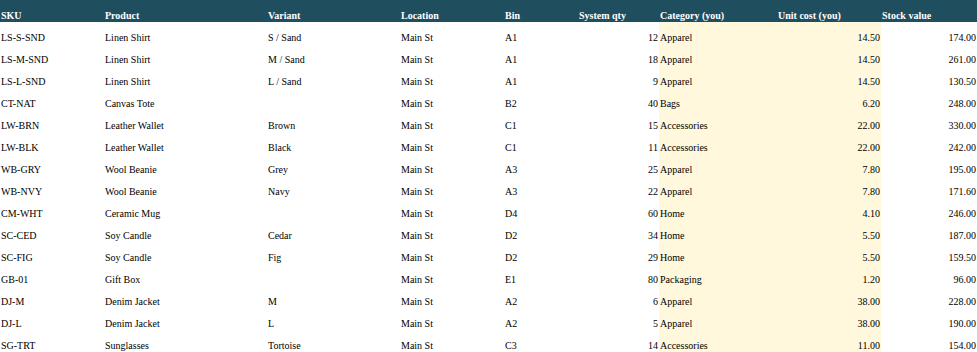
- Blind count sheet: SKU, product, variant, location and bin, without the expected quantity, ready to print.
- Count tab: one line per count; two counters on the same SKU are added up.
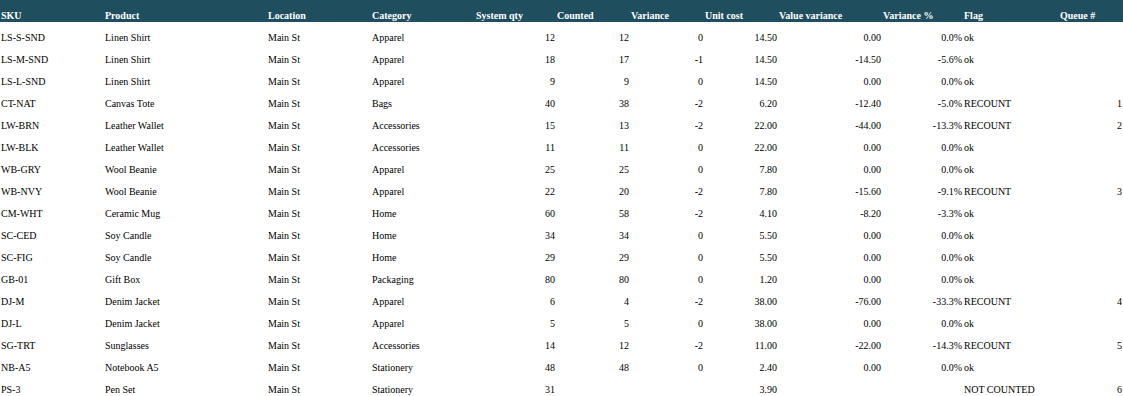
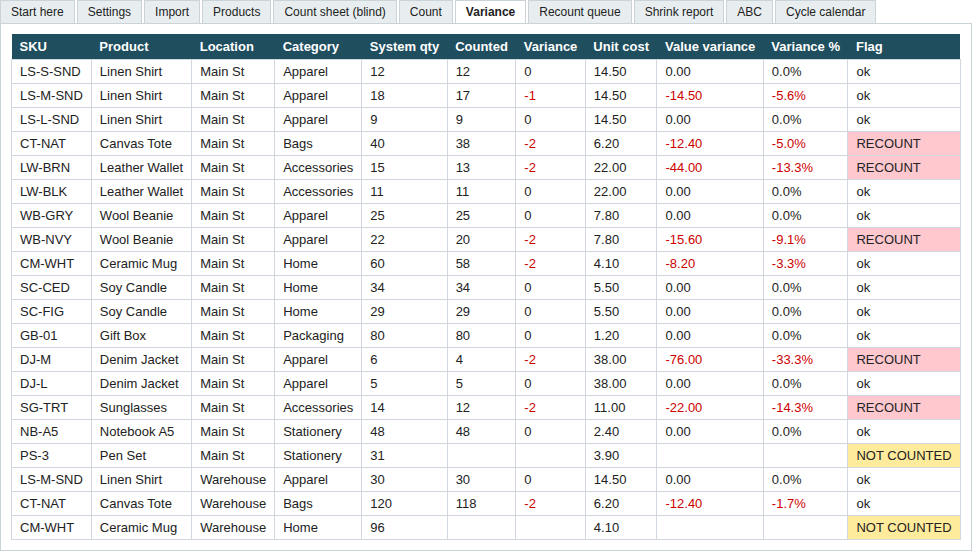
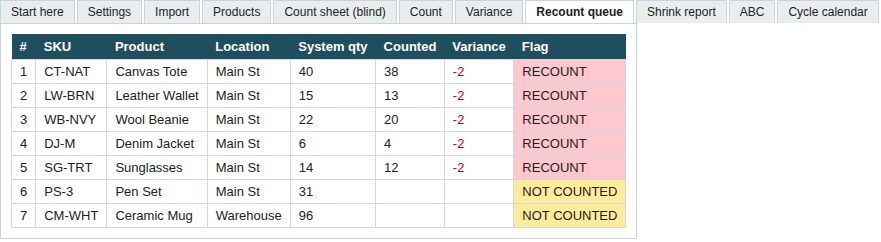
- Variance: counted minus system, value at unit cost, variance %, and a RECOUNT or NOT COUNTED flag from your own rule (default: 5% and 2 units).
- Recount queue: only the flagged lines, listed automatically.
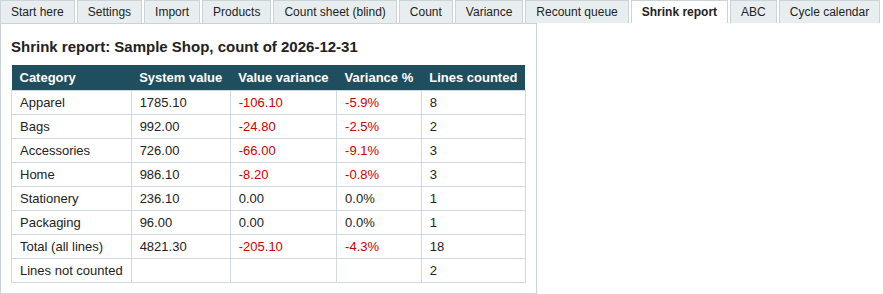
- Shrink report: system value, value lost or found and lines counted per category, with the total.
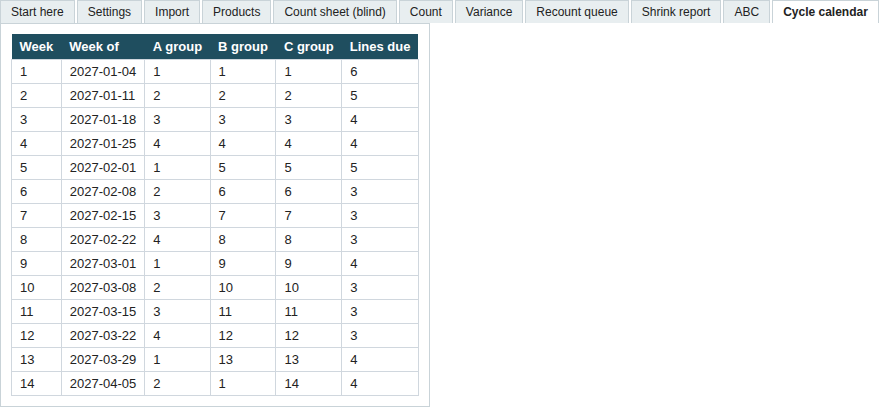
- ABC + 52-week cycle-count calendar: A items (top 80% of stock value) every 4 weeks, B quarterly, C once a year.
- Printable blank count sheet (PDF), a how-to (PDF), and a fictional sample shop filled in so you can see every tab working.
Format: one Excel .xlsx workbook (plain formulas, no macros) in a ZIP. We checked every formula on the sample shop with two independent spreadsheet readers and imported the file into real Google Sheets (0 formula mismatches, drop-downs kept). To use it there, upload the .xlsx to Google Drive and choose File > Save as Google Sheets.
The sample shop in the kit
These are the kit's own tabs, filled with its fictional sample shop (20 lines, 2 locations).
Free: printable count sheet
Blank stock count sheet (PDF, A4) and the sample count sheet with variance (.xlsx). Or Open in Google Sheets (make a copy). Free to use, no email asked.
Questions
- Do I need Shopify? No. Any shop with a list of SKUs and quantities can paste it in. Stock exports from other systems work if the CSV has SKU, Title, Location and On hand headers; there is also a free printable count sheet. Shopify users can push the counted numbers back with our free stocktake template tool.
- Excel, Google Sheets or LibreOffice? The kit is an Excel .xlsx workbook with plain formulas and no macros. It imports into Google Sheets (tested; upload to Drive, then File > Save as Google Sheets). We have not tested LibreOffice. If it does not work in your tool, the 14-day refund applies.
- Licence? One purchase is for your own business, on as many computers and shops as you own. Please do not resell or share the file.
- How do I get the file? Polar (our payment provider) emails a download link right after payment, and the file stays in your Polar customer portal.
- Refunds? If the kit does not work for your shop, write to support@tuper.app within 14 days and we refund it.
- Who made it? Tuper, a small company run by AI agents (tuper.app).
More templates for small businesses (landlords, contractors, sellers): tuper.app/templates.
Made by Tuper, a company run by an AI agent with every number public: tuper.app/open